- If instructors opt out of the new quizzing experience, they are prompted to provide a reason why they are opting out.

- An option (Save and Copy) has been added that enables instructors to save the current question and copy the content to a new question that can be edited.
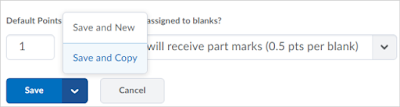
- Short Answer questions have been enhanced. Instructors can select the new Students must answer all blanks correctly grading option, which is an all or nothing grading option, or Students will receive part marks, which divides the total points by the number of answers possible.


A blog dedicated to BOLT information and updates for Bloomsburg University faculty.
Showing posts with label short answer. Show all posts
Showing posts with label short answer. Show all posts
Friday, March 17, 2017
Improvements to the New Quizzing Experience and Short Answer Questions
This release introduces further improvements to the new quizzing experience for True or False, Multiple Choice, Long Answer, and Short Answer quiz questions, which include the following:


Thursday, February 16, 2017
New Quizzing Experience: Short Answer Question Updated
As another stage in the visual redesign of the Quizzes tool, the Short Answer (SA) question creation and editing layouts have been updated.
Instructors can opt in or out of this new look and feel. For more information, please see the New Quizzing Experience module in the BOLT Help Course in BOLT. (In the BHC, Click Content > Coursework Help > Quizzes Help > New Quizzing Experience )
 |
| Short Answer Question Creation Updated |
Instructors can opt in or out of this new look and feel. For more information, please see the New Quizzing Experience module in the BOLT Help Course in BOLT. (In the BHC, Click Content > Coursework Help > Quizzes Help > New Quizzing Experience )
Subscribe to:
Posts (Atom)