Friday, July 31, 2020

2020 Fall Courses Now in BOLT

Information regarding 2020 Fall Courses:

  • Students will load into Fall courses by August 7th.
    • You must set your course to "active" for students to have access to it in BOLT.
  • COMBINED COURSES - Change in Process
    • Due to the fluid situation of schedules and addition of multiple sessions for Fall many of the combine requests received via the BOLT Combine Request tab in the Faculty Center in MyHusky are no longer valid and we will not be able to honor those original requests.  However, you may still request course combine for courses that are in the same session.
    • Please send your combine request to imdc@bloomu.edu and include:
      • Your name
      • Courses/sections to combine
      • Confirmation that the requested combines are in the same session
    • We greatly appreciate your patience with this change in process for Fall 2020.

Locating 2020 Fall course(s) in BOLT:

cursor on select a course grid icon and over the pin icon to the right of a 2020Fall course
  1. Click the Select a course (grid) icon at the top of the page in BOLT.
  2. 2020Fall course(s) will display in the list.
  • If you have a search field, type "2020Fall" and click the magnifying glass icon to Search for only those courses.
  • You can pin your courses to pin them to the top of your list for easy access during the session.

Via My Courses Widget

cursor over 2020Fall semester filter in My Courses widget and Fall courses displayed with inactive filter over the course image
  1. Click the semester filter for "2020Fall" or else click the arrow to expand the filter menu and click "2020Fall".
  2. Courses will display for that semester/session with an Inactive filter over the course image.

Support Information:

IMDC Learning Lounge

24/7 BOLT Technical Support

  • Call 1-866-921-0473
  • Use the BOLT Support widget in BOLT to access knowledge articles or email for help & support.
  • Access the searchable IMDC Infobase at http://bloomuimdc.freshdesk.com

Thank you,

IMDC Staff

Tuesday, April 21, 2020

2020 Summer Courses Now in BOLT

Information regarding 2020 Summer Courses:

  • Students will load into Summer courses on May 7th.
    • You must set your course to "active" for students to have access to it in BOLT.
  • Want Fall course sections combined in BOLT? The extended deadline was April 20th but if you have a late contract or assignment, you can contact us prior to the start of the semester with a special request for course combine at imdc@bloomu.edu.

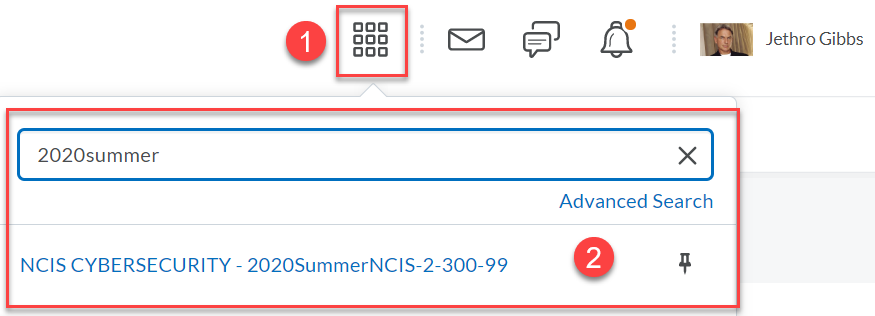
Locating 2020Summer course(s) in BOLT:

cursor on select a course grid icon and over the pin icon to the right of a 2020Summer course

  1. Click the Select a course (grid) icon at the top of the page in BOLT.
  2. 2020Summer course(s) will display in the list.
    • If you have a search field, type "2020Summer" and click the magnifying glass icon to Search for only those courses.
    • You can pin your courses to pin them to the top of your list for easy access during the session.
Via My Courses Widget
cursor over 2020 Summer semester filter in My Courses widget and Summer courses displayed with inactive filter over the course image

  1. Click the semester filter for "2020Summer" or else click the arrow to expand the filter menu and click "2020Summer"
  2. Courses will display for that semester/session with an Inactive filter over the course image.

Support Information:

IMDC Learning Lounge

24/7 BOLT Technical Support

  • Call 1-866-921-0473
  • Use the BOLT Support widget in BOLT to access knowledge articles or email for help & support.

Monday, March 2, 2020

BOLT Course Combine Request for 2020 Summer Available


If you teach multiple sections of the same course and want to combine the sections in BOLT for 2020 Summer, the BOLT Combined Request tab in MyHusky is now available. If you want to combine the sections, please visit the Faculty Center in MyHusky and click the BOLT Combined Request tab and complete the form. For directions, check out the Course Combine Request widget on the BOLT My Home page.


DEADLINE for course combine request for Summer: April 01, 2020


NOTE: Requests must be completed by the deadline. After the deadline, requests will be accepted only if there is a schedule change, new instructor hire, or late contract/assignments.


Lecture/Lab/Clinical

If you teach a lecture course with multiple lab or clinical sections but don’t have access to all sections in MyHusky, please submit a request by emailing us at imdc@bloomu.edu. Please be sure to include the course and ALL sections that should be combined.


Thank you,

Chaya, Jared, Jon, and the IMDC Staff


Need help with instructional technology?

  • Faculty, staff, and students can reach us at the IMDC!
    • M-F 9am to 4pm
    • Faculty can visit us in Andruss Library 206.
    • Faculty, staff, and students can reach us at (570)389-2065 or imdc@bloomu.edu!
  • Helpful articles are available on the IMDC Infobase: https://bloomuimdc.freshdesk.com
  • Documentation is available in the BOLT Help Course in BOLT
    • Click Help
    • Click BOLT Help Course
  • Technical Support is Available After Hours
    • For BOLT after hours technical support, call 1-866-921-0473.
    • For Zoom technical support, call 1-888-799-9666.
    • For TurningPoint technical support, call 1-866-746-3015.

Thursday, November 14, 2019

2020 Spring Courses Now in BOLT

Information regarding 2020 Spring Courses:

  • Students will load into Spring courses on January 10th.
    • You must set your course to "active" for students to have access to it in BOLT.
  • Want Spring course sections combined in BOLT? The deadline was November 13th but if you have a late contract or assignment, you can contact us prior to the start of the semester with a special request for course combine at imdc@bloomu.edu.

Locating 2020 Spring course(s) in BOLT:

cursor on select a course grid icon and over the pin icon to the right of a 2020Spring

  1. Click the Select a course (grid) icon at the top of the page in BOLT.
  2. 2020Spring course(s) will display in the list.
    • If you have a search field, type "2020Spring" and click the magnifying glass icon to Search for only those courses.
    • You can pin your courses to pin them to the top of your list for easy access during the session.
Via My Courses Widget
cursor over 2020Spring semester filter in My Courses widget and Spring courses displayed with inactive filter over the course image


  1. Click the semester filter for "2020Spring" or else click the arrow to expand the filter menu and click "2020Spring"
  2. Courses will display for that semester/session with an Inactive filter over the course image.

Support Information:

IMDC Learning Lounge

  • Andruss Library 206
  • Monday - Friday | 9am to 4pm
  • Email us at imdc@bloomu.edu
  • Call us at (570)389-2065

24/7 BOLT Technical Support

  • Call 1-866-921-0473
  • Use the BOLT Support widget in BOLT to create a support ticket or access the knowledge base for support articles.

Monday, October 14, 2019

Improvements to Consistency in BOLT

With our October update at the end of this week, there will be numerous changes to BOLT in the language and workflows controlling visibility of items.

Here are the key changes:
  1. Language used to denote an activity is not visible to a learner will be “Hidden” and noted with a consistent visibility icon. 
  2. Differing visibility controls will change to a checkbox. 
  3. Visibility controls will appear on the Restrictions tab. (This is a big change in Discussions!) 
  4. Consistent ordering of activity and tool specific icons on activity list pages. 
  5. Visibility icon switch in Content. 
  6. TOC flyout will no longer allow changes to visibility. 
  7. TOC completion method icon switch in Content. 
  8. New activities will have Save, not Publish buttons (and will include the “hide from users” checkbox consistent with the other tools. 
  9. Visibility controls in context menus (drop down menus) of modules and topics. 
For more information, please read on.

Monday, July 1, 2019

Turnitin Unavailable July 13 11am EST to 7pm EST

Please note Turnitin will be unavailable on Saturday, July 13, from 11am to 7pm EST. This means submissions and grading via Turnitin will not be possible during this time. We advise submission deadlines be set outside of this maintenance window.

Please plan accordingly.

Thursday, June 6, 2019

2019 Fall Courses Now in BOLT

Information regarding 2019 Fall Courses:

  • Students will load into Fall courses on August 15th.
    • You must set your course to "active" for students to have access to it in BOLT.
  • Want Fall course sections combined in BOLT? The deadline was June 4th but if you have a late contract or assignment, you can contact us prior to the start of the semester with a special request for course combine at imdc@bloomu.edu.

Locating 2019 Fall course(s) in BOLT:

cursor on select a course grid icon and over the pin icon to the right of a 2019Fall course
  1. Click the Select a course (grid) icon at the top of the page in BOLT.
  2. 2019Fall course(s) will display in the list.
    • If you have a search field, type "2019Fall" and click the magnifying glass icon to Search for only those courses.
    • You can pin your courses to pin them to the top of your list for easy access during the session.
Via My Courses Widget
cursor over 2019Fall semester filter in My Courses widget and Summer courses displayed with inactive filter over the course image
  1. Click the semester filter for "2019Fall" or else click the arrow to expand the filter menu and click "2019Fall"
  2. Courses will display for that semester/session with an Inactive filter over the course image.

Support Information:

IMDC Learning Lounge

  • Andruss Library 206
  • Monday - Friday | 9am to 4pm
  • Email us at imdc@bloomu.edu
  • Call us at (570)389-2065

24/7 BOLT Technical Support

  • Call 1-866-921-0473
  • Use the Support Portal widget in BOLT to access live chat, email, and knowledge base technical support.

PSST! Come to our Web Conferencing Wednesdays Sessions!

We told you we would have more information about upcoming training sessions! The first bunch we want you to know about are all about our web conferencing tool Zoom. On select Wednesdays we are offering “Introduction to Zoom” trainings. In August as our training schedule picks up prior to Fall, we will also offer “Engaging Students in Zoom”.

If you are new to Zoom and want to learn how to use it to conduct online meetings or classes, please consider registering for “Introduction to Zoom” on one of our Web Conferencing Wednesdays.

If you are looking to increase engagement or do more activities in your Zoom meetings, please consider attending “Engaging Students in Zoom” in August.

Trainings will take place in Andruss Library 243!

Registration for sessions is required and is available at https://forms.gle/KQReopJmV4JCysGq5

We look forward to seeing you soon!

Friday, May 10, 2019

Students Now Enrolled in BOLT Courses for 19 Summer

Students are now visible in the Classlist of 2019Summer courses in BOLT.

REMINDER: You must set your course to active in order for students to see and access it in BOLT.

Locating 2019 Summer course(s) in BOLT:


  1. Click the Select a course (grid) icon at the top of the page in BOLT.
  2. 2019Summer course(s) will display in the list. 
click the Select a course grid icon to see courses displayed in the list or search for 2019Summer to see courses" title="click the Select a course grid icon to see courses displayed in the list or sea" title="click the Select a course grid icon to see courses displayed in the list or search for 2019Summer to see courses

  • If you have a search field, type "2019Summer" and click the magnifying glass icon to Search for only those courses.
  • When the Summer session begins, we recommend pinning the course(s) to your My Courses widget for easy access to the course(s).
Courses are inactive by default! You will see the word “Inactive” tagged to your course(s) in the My Courses widget. STUDENTS CANNOT SEE OR ACCESS INACTIVE COURSES.
When you want students to be able to see and access the course, set it to active:
  • Click on a course name in BOLT to enter the course.
  • Click Course Admin.
  • Click on "Course Offering Information" in Course Admin.
  • Scroll down and check the box in front of "Course is active".
  • Click the "Save" button.
No course(s) found? Please verify you are listed in MyHusky as the instructor for the course(s) before contacting us. It takes 24-48 hours once you are listed as the instructor in MyHusky for you to gain access to the course in BOLT.

Support Information:

Instructional Media and Design Center

Learning Lounge - Andruss Library 206
Summer Hours: M/W/F 12pm - 4pm
Email us at imdc@bloomu.edu
Call us at (570)389-2065

24/7 BOLT Technical Support

Call 1-866-921-0473
Use the Support Portal widget in BOLT to access live chat, email, and knowledge base support.
Access the searchable IMDC Infobase at http://bloomuimdc.freshdesk.com
In BOLT, click Help, then BOLT Help Course to access other step by step docs and video tutorials.

Friday, April 12, 2019

BOLT Will Be Unavailable Sunday, May 12 from 2am to 12pm EST

Please note that BOLT will be unavailable to all end users on Sunday, May 12, 2019 from 2am to 12 noon EST. A maintenance page will appear during this time and no access to the site will be possible during the window. This scheduled time was moved by D2L to accommodate activities during finals week. Please schedule BOLT activities accordingly.


Impact: BOLT will be inaccessible to all end users during the scheduled downtime.
When: 05/12/2019 2AM - 12PM EST
Why: D2L is migrating all Brightspace clients to AWS.


Common Questions:


Will this affect my course content?
No. This will not affect course content or other work done in courses.


Will this affect student work in my courses?
No. This migration won't affect student, or any end user, data.


If you have any questions, contact us at imdc@bloomu.edu.


Thank you,
IMDC Staff

Wednesday, April 10, 2019

BOLT Course Combine Request for 2019 Fall Available


If you teach multiple sections of the same course and want to combine the sections in BOLT for 2019 Fall, the BOLT Combined Request tab in MyHusky is now available. If you want to combine the sections, please visit the Faculty Center in MyHusky and click the BOLT Combined Request tab and complete the form. For directions, check out the Course Combine Request widget on the BOLT My Home page.


DEADLINE for course combine request for Fall: June 4, 2019


NOTE: Requests must be completed by the deadline. After the deadline, requests will be accepted only if there is a schedule change, new instructor hire, or late contract/assignments.


Lecture/Lab/Clinical

If you teach a lecture course with multiple lab or clinical sections but don’t have access to all sections in MyHusky, please submit a request by emailing us at imdc@bloomu.edu. Please be sure to include the course and ALL sections that should be combined.


Publisher Integrations

If you are using publisher integrations in your course, there is no longer a need to request them. You now have the ability to choose homepages for the McGraw-Hill Connect or Pearson MyLabs & Mastering integrations, and to use Course Builder to add Cengage or TestOut. We recommend working with your publisher rep to help set up your materials on the publisher end, and connect the BOLT course with your publisher access once courses are available in June.


Spring Ahead with Zoom, Part 2

Just an early heads up that one of our staff at the IMDC will be offering training sessions on Zoom (https://bloomu.zoom.us) this summer. Please stay tuned! Details about that and other trainings will be in an upcoming BOLT Bulletin!


Thank you,

Chaya, Jared, and the IMDC Staff


Need help with instructional technology?

  • Faculty, staff, and students can reach us at the IMDC!
    • M/T/Th/F 9am to 4pm, W 10am to 4pm.
    • Faculty can visit us in Andruss Library 206.
    • Faculty, staff, and students can reach us at (570)389-2065 or imdc@bloomu.edu!
  • Helpful articles are available on the IMDC Infobase: https://bloomuimdc.freshdesk.com
  • Documentation is available in the BOLT Help Course in BOLT
    • Click Help
    • Click BOLT Help Course
  • Technical Support is Available After Hours
    • For BOLT after hours technical support, call 1-866-921-0473.
    • For Zoom technical support, call 1-888-799-9666.
    • For TurningPoint technical support, call 1-866-746-3015.


Friday, January 11, 2019

NEW Feature Available to Instructors: Select which course homepage to use

In our Fall BOLT survey we asked if instructors preferred having a homepage set for you or if you would prefer being able to choose between different course homepage layouts and options.
  • 31% preferred having the homepage set.
  • 48% preferred having the ability to choose between different homepages.
  • 20% did not have a preference.

Starting NOW, instructors can select a course homepage for each course in BOLT.


All courses will have a default course homepage. If you want to use integrations such as Pearson MyLab and Mastering, or McGraw-Hill Connect, you can change your homepage to one with that integration. (If you already have an integration set up for 2018Winter or 2019Spring, don’t worry- your courses are still connected and set up! Previous semester courses are also still connected, but would need a homepage change to show your widget.)


What this means for you:
  • You can select homepages for different purposes in different courses.
  • You no longer need to request the Pearson MyLabs & Mastering integration.
  • You no longer need to request the McGraw-Hill Connect deeper integration.


Currently we have the default homepage, a Pearson homepage, and a McGraw-Hill homepage. In the future, other course homepages will be available to instructors to trial or use new tools and other features of BOLT.


For now, if you want to learn how to change your homepage, you can find information in both the BOLT Help Course in BOLT (in the Course Customization module) and on the IMDC Infobase at https://bloomuimdc.freshdesk.com/support/solutions/folders/35000211013

Friday, November 16, 2018

IMDC Learning Lounge CLOSED Nov 19-23

Please note the IMDC Learning Lounge in Andruss Library 206 will be closed the week of Nov 19th. However, if you need assistance with BOLT or other instructional technology, you can still reach us at imdc@bloomu.edu. 


If you need assistance right away, we also have 24/7/365 BOLT technical support at 1-866-921-0473, and technical support for Zoom at 1-888-799-9666. For assistance with Bloomsburg network systems, we recommend contacting the Bloomsburg University Help Desk at (570)389-4357.


We will reopen the Learning Lounge on Nov 26 at 9am. Thank you for your understanding. 


See you soon,
IMDC Staff

Friday, October 5, 2018

If you're using clickers in the classroom, here are some resources and tips you may find helpful.

Whether you are new to clickers or a seasoned veteran of our student response system, you may need some help now and then to keep things rolling smoothly. You may also want to think about new ways to use clickers, and see what others are doing. We have some resources to share that will benefit you in all of these situations.


If you want to know more, please read on.

Thursday, September 27, 2018

NOTICE: Use of Proctoring Tools in BOLT at Bloomsburg University

The IMDC provides several options to improve quiz security for online quizzing at Bloomsburg University. However, we have noticed an increase in the use of our ProctorU solution and want to make sure it is clear the purpose and use of the different tools.


ProctorU is intended ONLY for high stakes online exams which require test-taker identification for accreditative purposes.


ALL OTHER online quizzes and exams should use Respondus LockDown Browser and Monitor.


ProctorU exams should be scheduled by students at least 72 hours prior to the time they want to take their exam.


The IMDC will be monitoring use of these services and will make inquiries if this is not observed.


If you have questions please contact us at the IMDC.

Survey available in BOLT

A survey on the use of the features of BOLT is available to faculty. You can find the survey at the upper right hand corner of the BOLT My Home page, or visit https://www.surveymonkey.com/r/6FG2Y6F


This survey is for FACULTY ONLY.


We appreciate any time taken to respond. Thank you!

Spring Course Combine Period Begins

If you are teaching more than one section of a class in the Spring and want them combined in BOLT, you can make your requests via MyHusky.


There is more information in BOLT about both this and Winter course combine requests. Please note Winter course combine requests are done via Google form at https://goo.gl/forms/ZbMAooN0YhYhW2ql2, but Spring requests are made directly in MyHusky once you are listed as the instructor in the courses in MyHusky.


If you are teaching a lecture/lab and want courses combined, you can make that request via email. Email us at imdc@bloomu.edu and let us know which sections you want combined for Spring.


The deadline for Spring requests is October 31st.


Thursday, September 20, 2018

You can now request combined course sections for Winter session!

If you're teaching multiple sections of the same course this Winter and want to combine your sections in BOLT, please complete the Winter BOLT Course Combine Request form at https://goo.gl/forms/ZbMAooN0YhYhW2ql2.


The deadline for this is October 19, 2018. Requests after the deadline will only be accepted for special circumstances.


If you need to request publisher integrations for Winter, use the links below.


Pearson request form: https://goo.gl/forms/ziV057YodfBKcrE52
McGraw-Hill Connect form: https://goo.gl/forms/CgHvk09yog4gW6S72


The deadline for requesting integrations for Winter is December 05, 2018.


If you have any questions please reach out to imdc@bloomu.edu

Monday, August 13, 2018

IMDC Trainings August 20-24: Register by Friday, August 17th!

The IMDC is offering training sessions for BOLT and other items of interest the week of August 20th. All sessions will take place in Andruss Library 243. Registration for workshops is required by August 17th. Register at https://goo.gl/forms/iKd3qGAkxD5bOH1L2


Zoom Workshops

Monday, August 20 at 9am and Friday, August 24 at 11am
Do you need to use web conferencing for online office hours or synchronous class sessions? We recently transitioned to a new web conferencing tool. Come to this session if you are new to Zoom and want to learn how to use it.


TurningPoint 8 Sync Workshop

Tuesday, August 21 at 2pm
Instructors responded to our poll and we selected the date that was best for most. At this workshop we will explore the new version of TurningPoint and show how you can easily sync up your BOLT course with the new software for participant list and grade sync. Come to this session to learn the new, simplified workflows and features exclusive to this new version of TurningPoint.


Build it in BOLT Series


BOLT Basics

Tuesday, August 21 at 9am
If you're new to BOLT and want to learn what you can do, come to this workshop. We will cover the basics to get you acquainted to BOLT and its tools.
If you're teaching online, join us for a doubleheader: There is a Best Practices for Teaching Online session after this session!

BOLT Gradebook

Wednesday, August 22 at 10am
If you need to learn how to set up Grades in BOLT, come to this workshop. We will explain how the Grades tool works and assist with setting up your BOLT Grades tool.


BOLT Assignments

Wednesday, August 22 at 2pm
Do you want students to submit work to BOLT? If you want to use the Assignments tool in BOLT, come learn how at this workshop. Recently we had an update that allows students to submit an assignment without uploading a file! We also have a new version of Turnitin for Fall. We will showcase these updates and other features of the tool at this workshop.


Turnitin

Wednesday, August 22 at 3pm and Friday, August 24 at 9am
We have a new Turnitin integration in BOLT for Fall. Adding Turnitin is easier than ever with the new Turnitin tab in the Assignments tool. Come to this workshop to find out how to set up assignments with plagiarism checking using this new integration with Turnitin.


For a double-header, come to our Wednesday Assignments session and then this Turnitin session to knock it out of the park with Assignments this fall!

BOLT Quizzes

Thursday, August 23 at 9am
Quizzes has undergone some changes over the past year as part of a Quizzes improvement by our software vendor. Come to this session to find out what is new, what is coming, and what you can do right now in the Quizzes tool.


BOLT Rubrics

Thursday, August 23 at 10am
The Rubrics tool is the latest tool in BOLT that is getting a major upgrade from our software vendor. Come to this session to find out what is new, what is on the way, and what you can do with Rubrics in BOLT!


Content Building

Thursday, August 23 at 2pm
If you're teaching online you will probably use the Content tool in BOLT a lot. Come to this session to find out how and what you can build in the Content tool in your course.


Online Teaching Series


Video Tools

Monday, August 20 at 11am and Thursday, August 23 at 3pm
Build presence in online courses using video tools available in BOLT. This workshop will showcase the different video tools available in BOLT and how you can use them to create presence in your online course and course activities.


Best Practices

Tuesday, August 21 at 10am
If you're new to teaching online, these best practices for teaching online will help you get rolling on your online learning journey. Use the best practices in this workshop to get started teaching online.
If you're NEW to teaching with BOLT, join us for a doubleheader: There is a BOLT Basics session before this session!

Thursday, August 2, 2018

Zoom Trainings in August!

Zoom is offering specialized trainings for PASSHE this month, and the IMDC is offering training on Zoom the week prior to classes starting for the Fall.


the zoom logo with the subtext train the trainer


Zoom: Train the Trainer
When: Thursday, August 2 at 2pm EST
Who: If you need to assist people with using Zoom to conduct meetings, sessions, or classes, then this session may be what you need.
How: Email us at imdc@bloomu.edu for the invitation link!


Zoom Webinar: End User Training
When: Thursday, August 30 at 2pm EST/11am PST
Who: All Zoom end users will benefit from attending this webinar!
How: Register for this webinar at https://success.zoom.us/webinar/register/WN_BEAgqNLOR4S4S3gcaZzhqA


You will receive a confirmation email with information on how to join the webinar!


IMDC Training: Zoom
When: Monday, August 20 at 9am or Friday, August 24 at 11am
Who: Faculty and staff who want to use Zoom
How: Register at https://goo.gl/forms/iKd3qGAkxD5bOH1L2


Recorded IMDC Zoom Essentials training: https://bupmediasite.passhe.edu/Mediasite/Play/fe3588f674e24b4f804a6c2e57fa42c41d

Thursday, June 28, 2018

New in BOLT: Question Pools have replaced Random Sections in Quizzes

D2L has phased out the random section feature and added question pools to quizzes. This functions similarly but has an improved workflow.


Question pools will allow you to select a number of questions and define how many of those questions show up on each student's attempt. Then BOLT will randomly add that number of questions to each student's quiz attempt.


Here is a video describing how you can create question pools in your quizzes:


Video transcript:
In your quiz, click Add/Edit Questions.
Click New, and select Question Pool.
On the Question Pool screen, give the pool a name.
Type the number of questions from the pool you want each student to get on their quiz.
Type the number of points for each question in the pool.
Click Browse Question Library.
Find the questions you want to add to the pool and select them.
Click Add.
The questions are added to the pool.
Click Save.
Your pool is added to the quiz.


The BOLT Help Course documentation has been updated to reflect this feature change.