The IMDC has a new email address. Please update your contacts.
If you want to contact the IMDC, please email us at imdc@bloomu.edu!

A blog dedicated to BOLT information and updates for Bloomsburg University faculty.
Tuesday, April 18, 2017

Long Answer question type renamed to Written Response on April 21st
On April 21st in the Quizzes tool, the Long Answer (LA) question type will be changing to Written Response (WR).
The change will NOT affect any of your Long Answer (LA) questions. This is a name change only.
The question type was renamed to make the name more intuitive for instructors.
The change will NOT affect any of your Long Answer (LA) questions. This is a name change only.
The question type was renamed to make the name more intuitive for instructors.
Tuesday, April 4, 2017
Changes to BOLT Coming May 19, 2017
Daylight is coming to BOLT in August.
What is Daylight?
Daylight is a fresh, new look for BOLT. Starting on August 17, 2017, you will notice a new look and feel for Brightspace. Courses will look more polished and modern than ever.
To get ready to flip the switch to Daylight, you will notice some changes to navigation bars in BOLT starting on May 19, 2017.
The first place you will see a change is in the My Home page navigation bar:
The second place you will see a change is in the Course navigation bar:
For detailed information on each new menu, please follow the cut to read more.
What is Daylight?
Daylight is a fresh, new look for BOLT. Starting on August 17, 2017, you will notice a new look and feel for Brightspace. Courses will look more polished and modern than ever.
 |
| Brightspace Daylight Experience, coming to BOLT August 2017
|
The first place you will see a change is in the My Home page navigation bar:
 |
| BOLT FUTURE My Home Navigation, update to occur on May 19 |
The second place you will see a change is in the Course navigation bar:
 |
| BOLT FUTURE Course Navigation, update to occur on May 19
|
For detailed information on each new menu, please follow the cut to read more.
Friday, March 17, 2017
Changes at BOLT Support Now Live!
As of March 13, 2017 we have transitioned to premium support services for instructors.
You can use the Support Portal widget in BOLT to access the live chat feature, email support, and knowledge base.
Hands on assistance is still available to instructors in Andruss Library 206.
If you want hands on help with your BOLT courses, Clickers, or other instructional technology, please stop by to see us in AL 206 Monday through Friday, 8am to 5pm during the Spring semester, and 8am to 4pm during breaks and summer sessions! If you want to make an appointment, call us at (570)389-2888 and follow the menu prompts.
What are the Benefits?
 |
24/7/365 Support You have 24/7/365 access to direct technical support from our vendor. Live chat, email, and phone support are all available for assistance in real time. |
 |
|
Live Support in Real Time There is a live chat feature in BOLT. Just click on the LiveChat icon in the Support Portal widget to chat live with a support technician in real time. |
|
|
DIY Support with Knowledge Base If you like to DIY your technical issues, you are able to browse and search a curated, custom knowledge base with step-by-step instructions on the how-to's of BOLT. |
What Changed?
You can call 1-866-921-0473 for support 24/7/365.You can use the Support Portal widget in BOLT to access the live chat feature, email support, and knowledge base.
What About Hands on Help?
Hands on assistance is still available to instructors in Andruss Library 206.
If you want hands on help with your BOLT courses, Clickers, or other instructional technology, please stop by to see us in AL 206 Monday through Friday, 8am to 5pm during the Spring semester, and 8am to 4pm during breaks and summer sessions! If you want to make an appointment, call us at (570)389-2888 and follow the menu prompts.
Exempt a Student from Multiple Grade Items
Instructors can now exempt students from a number of grade items at once by using the Bulk edit exemptions option in Enter Grades. This improves upon the new Grade Exemption feature in BOLT.
To exempt a student from multiple grade items at once,
To exempt a student from multiple grade items at once,
- In the course, click Coursework.
- Select Grades.
- Click Enter Grades.
- Click on the student's name.
- Click the drop down arrow.
- Select Bulk edit exemptions.
- Select the checkboxes for all the grade items to exempt the student from.
- Click Save and Close.


Improvements to the New Quizzing Experience and Short Answer Questions
This release introduces further improvements to the new quizzing experience for True or False, Multiple Choice, Long Answer, and Short Answer quiz questions, which include the following:
- If instructors opt out of the new quizzing experience, they are prompted to provide a reason why they are opting out.

- An option (Save and Copy) has been added that enables instructors to save the current question and copy the content to a new question that can be edited.
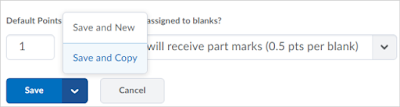
- Short Answer questions have been enhanced. Instructors can select the new Students must answer all blanks correctly grading option, which is an all or nothing grading option, or Students will receive part marks, which divides the total points by the number of answers possible.


Monday, March 6, 2017
BOLT will be unavailable Sunday, March 12 between 1am and 7am EST
Every month, BOLT undergoes a maintenance window. This month’s
maintenance window is on Sunday, March 12, 2017 from 1:00am to 7:00am ET. BOLT
will be unavailable during this time. Please plan accordingly.
Maintenance Window FAQ
Q: Where are the maintenance dates announced?
A: Maintenance dates are announced here on our BOLT Students
blog, our BOLT Blog for faculty, and in the News items on your My Home page in
BOLT.
Q: What will happen if I try to log in during a maintenance period?
A: A page will load that says Desire2Learn is unavailable due
to scheduled maintenance.
Q: Why am I still seeing a page that tells me D2L is unavailable after the maintenance window?
A: If you tried to login to BOLT during the maintenance
window, your browser may be loading the scheduled maintenance page from its cache
memory. If you encounter this page outside of the maintenance window, please
clear your browser cache before trying to login to BOLT again.
Q: This is a bad time for BOLT to be unavailable. Can maintenance be rescheduled?
A: We understand frustration when BOLT downtime occurs during
busy times of the academic year. Unfortunately, we cannot reschedule the
maintenance windows. The IMDC has no control over the regularly scheduled maintenance windows. They are scheduled by our vendor and are necessary to keep
BOLT working optimally.
Subscribe to:
Posts (Atom)