Showing posts with label announcements. Show all posts

Friday, February 16, 2018

Improvements: Advanced image editing in the HTML editor

This feature updates the HTML Editor to include expanded image editing capabilities. Users can now edit images in place (including flipping, rotating, and adjusting brightness, sharpness, and color), edit the image description, and edit the size of the image. They can save image edits to Manage Files.


Advanced image editing screen in the HTML Editor
Image editing provides the ability to customize image description and sizing
Manually resize the image in the image editor


This update is currently exclusive to creating discussion posts, announcements, and content topics.


Thursday, July 20, 2017

Improvements to the HTML Editor in BOLT

Do you use the Create a File feature in Content, post Announcements, or use the Discussions tool in BOLT? If you do, you may notice some improvements to the HTML editor used in all these places.
 
  • Unsaved Changes Prompt
  • Preserved Formatting from Microsoft Word
 

Unsaved Changes Prompt

If you are working on a file, and you try to navigate away from the page without saving, your browser will display a prompt to let you know that you have unsaved changes and give you the choice to leave or stay on the page to save your file.
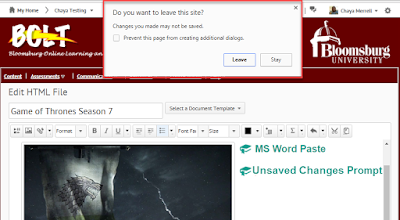


a screenshot of editing an HTML file in the HTML editor with a browser prompt to leave or stay on the page
New Unsaved Changes Prompt for the HTML Editor


Preserved Formatting from Microsoft Word

When you copy and paste from Word, the formatting in the Word document will be preserved when you paste into the HTML editor. Images pasted from Word will save to your course files in Manage Files.


screenshot of editing an HTML file in the HTML editor with images and tables pasted from Word with preserved formatting
New Preserved formatting in HTML Editor when pasting from Microsoft Word

Friday, January 20, 2017

New: Quicklink to an Announcement

Do you want to call students’ attention directly to one of your announcements?


Would you like to email your Classlist and include a direct link to your announcements? Do you have an html content item about an assignment you’d like to add a link to a related announcement to?


screenshot of the Insert Quicklink button in the HTML editor in BOLT


You now have the ability to link to an announcement in the HTML editor using the Insert Quicklink button. It simplifies the process of referencing announcements and bringing them to the attention of learners.


Thursday, June 16, 2016

Course Announcements in Courses Only

Starting June 17th, course announcements will no longer be visible on the My Home page.


Course announcements will still be visible in the Announcements widget on the course home page.


Notifications settings will remain the same. If students have opted to receive announcements notifications, they will still receive them as usual.