Showing posts with label combine. Show all posts

Thursday, September 21, 2017

Winter Course Combine Requests Due 10/19/17

Process for Requesting 2017 Winter Combined Courses

If you want to combine courses for 2017 Winter, please complete the 2017Winter BOLT Course Combine Request form at https://goo.gl/forms/vKAsuVtFuzzM5yU43


The form is also available as a widget on the My Home page in BOLT.


This information is also in the BOLT Help Course in BOLT. To access the BOLT Help Course, go to https://bolt.bloomu.edu, login, click Help, and click BOLT Help Course.


Deadline for Combined Course Requests for Winter: October 19, 2017


NOTE: Requests must still be completed by the given deadline. Requests after the deadline will only be accepted if there is a schedule change, new instructor hire, or late contracts/assignments.


Pearson MyLabs & Mastering

Do you use the Pearson integration in your BOLT course? If you want to request the integration for Winter courses, please request the integration at our form here: https://docs.google.com/forms/d/18YOaVOSsbEJ7hStDlNqka7L3iGR-UTlNooM1gWB-50E/viewform


Deadline for Pearson Requests for Winter: December 6, 2017


If you have any questions, please let us know at imdc@bloomu.edu.

Thursday, June 16, 2016

BOLT FAQ: Time Savers in BOLT

Save Time with These BOLT Tips


Combine multiple sections of a course.
If you are teaching several sections of the same course in a semester, consider combining them into one course offering.
Use the Course Copy tool.
If you already developed a course, you can use the Course Copy tool to copy it over to a new semester’s course. Remember to modify dates and documents with semester or new information!
Upload and add multiple topics.
Zip multiple files, upload the zip file to the Manage Files area, and unzip the file there. Select the files and click Add Content Topics to add them to Content at once.
Use Copy features where possible.
Did you know you could copy quizzes, surveys, questions, and content files? If you create a “template” item, you can copy it to create similar items in your course.
Use Bulk Edit to modify multiple items.
Using the Bulk Edit feature allows you to make multiple changes to multiple items at once. The feature is available in a number of tools in BOLT. You can change names of items, dates settings, add conditions, or change the status of the items using Bulk Edit.

Wednesday, May 18, 2016

Did you know you can combine course sections into one course in BOLT?

Save Time and Energy with a Course Combine!

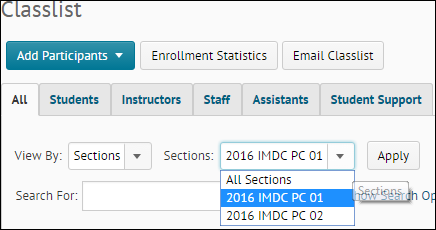
screenshot of filtering the classlist in a BOLT course by section
If you're teaching multiple sections of the same course in a semester, you can combine them into one course offering in BOLT! This saves time since you only have one course in BOLT to deal with!


For Example:
  • Instead of creating the same quiz again and again for each section, create the quiz once.
  • Upload one set of course materials one time.
  • Send email to all students at once or students in certain sections from the Classlist.
  • Assess and evaluate all students in one place.
For more information on combining courses, search for "combine" in the BOLT Help Course! Contact us at bolthelp@bloomu.edu if you have questions!

The request deadline for 2016Fall courses is June 1st!