- If instructors opt out of the new quizzing experience, they are prompted to provide a reason why they are opting out.

- An option (Save and Copy) has been added that enables instructors to save the current question and copy the content to a new question that can be edited.
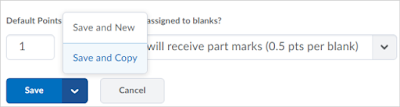
- Short Answer questions have been enhanced. Instructors can select the new Students must answer all blanks correctly grading option, which is an all or nothing grading option, or Students will receive part marks, which divides the total points by the number of answers possible.


A blog dedicated to BOLT information and updates for Bloomsburg University faculty.
Friday, March 17, 2017
Improvements to the New Quizzing Experience and Short Answer Questions
This release introduces further improvements to the new quizzing experience for True or False, Multiple Choice, Long Answer, and Short Answer quiz questions, which include the following:


Monday, March 6, 2017
BOLT will be unavailable Sunday, March 12 between 1am and 7am EST
Every month, BOLT undergoes a maintenance window. This month’s
maintenance window is on Sunday, March 12, 2017 from 1:00am to 7:00am ET. BOLT
will be unavailable during this time. Please plan accordingly.
Maintenance Window FAQ
Q: Where are the maintenance dates announced?
A: Maintenance dates are announced here on our BOLT Students
blog, our BOLT Blog for faculty, and in the News items on your My Home page in
BOLT.
Q: What will happen if I try to log in during a maintenance period?
A: A page will load that says Desire2Learn is unavailable due
to scheduled maintenance.
Q: Why am I still seeing a page that tells me D2L is unavailable after the maintenance window?
A: If you tried to login to BOLT during the maintenance
window, your browser may be loading the scheduled maintenance page from its cache
memory. If you encounter this page outside of the maintenance window, please
clear your browser cache before trying to login to BOLT again.
Q: This is a bad time for BOLT to be unavailable. Can maintenance be rescheduled?
A: We understand frustration when BOLT downtime occurs during
busy times of the academic year. Unfortunately, we cannot reschedule the
maintenance windows. The IMDC has no control over the regularly scheduled maintenance windows. They are scheduled by our vendor and are necessary to keep
BOLT working optimally.
Thursday, February 16, 2017
Changes Coming to BOLT Support
Our new
contract for Desire2Learn includes premium support services for instructors and
students. Staring the week of Spring Break, BOLT Support will transition to new
support processes for you.
- 24/7/365 Technical support for BOLT from our vendor for instructors and students.
- New support widget with a Live Chat feature for live chat with a support technician.
- Custom knowledge base with instructions on how to do things in BOLT.
Read on for more details.
Important Changes to Synchronous Tools
A delay in the
PASSHE RFP for a new Web Conferencing Tool means we must remain using
Blackboard Collaborate for one more year until June 30, 2018. However, Online Rooms is being phased out on
May 19, 2017.
Read on for more information.
Spring Ahead!
Get ready, Daylight is coming in 2018.
Daylight is the new look and feel coming to BOLT. It is a modern, responsive design to improve user experience in BOLT and emphasize your course Content.
Here is a sneak peak at Daylight on different devices:
We will be sharing more information with all BOLT users as the dawn approaches.
No, not Daylight Savings Time.
Daylight is the new look and feel coming to BOLT. It is a modern, responsive design to improve user experience in BOLT and emphasize your course Content.
Here is a sneak peak at Daylight on different devices:
 |
| Daylight Experience - Responsive Design coming to BOLT in 2018 |
We will be sharing more information with all BOLT users as the dawn approaches.
New Quizzing Experience: Short Answer Question Updated
As another stage in the visual redesign of the Quizzes tool, the Short Answer (SA) question creation and editing layouts have been updated.
Instructors can opt in or out of this new look and feel. For more information, please see the New Quizzing Experience module in the BOLT Help Course in BOLT. (In the BHC, Click Content > Coursework Help > Quizzes Help > New Quizzing Experience )
 |
| Short Answer Question Creation Updated |
Instructors can opt in or out of this new look and feel. For more information, please see the New Quizzing Experience module in the BOLT Help Course in BOLT. (In the BHC, Click Content > Coursework Help > Quizzes Help > New Quizzing Experience )
Are You Using or Want to Use Respondus LockDown Browser and Monitor? Join This Webinar!
Respondus is offering a webinar on Wednesday, February 22, 2017.
"How I Prevent Cheating During Online Exams" is a special webinar with instructor Tammi Kolski and Respondus. The webinar will include strategies and best practices for using Monitor with online exams, and include information on student feedback.
If you are using or thinking of using Respondus security tools for your online quizzes in BOLT, you can sign up to attend the webinar at https://attendee.gotowebinar.com/register/3084618679281039361?source=license
"How I Prevent Cheating During Online Exams" is a special webinar with instructor Tammi Kolski and Respondus. The webinar will include strategies and best practices for using Monitor with online exams, and include information on student feedback.
If you are using or thinking of using Respondus security tools for your online quizzes in BOLT, you can sign up to attend the webinar at https://attendee.gotowebinar.com/register/3084618679281039361?source=license
Subscribe to:
Posts (Atom)